dragon.ABD · Outpatient Care Service
Assess needs.
Plan care.
Bill services.
dragon.ABD combines needs assessment, staff scheduling, documentation, and billing into a comprehensive digital solution for outpatient care services. Keep track of service quotas, qualification levels, and services rendered.
Discover features- Targeted scheduling.
- Mobile documentation.
- Digital signature.
From individual needs to billing.
Your care services. Your overview.
Connecting processes.
Mastering complexity.
The pilot project for recording and billing assistance services under Section 78 of the Social Code Book IX (SGB IX) encompasses the distinction between qualified assistance provided by specialists and supportive assistance provided by support staff, qualification levels (QL 1–4), internal service differentiation, and flexibility ranges for service delivery.
Structure needs
Record individual assistance needs and create service quotas—for example, based on the approved authorization notice.
Deploy staff strategically
Assign staff members to clients based on their qualification levels and the identified needs.
Verify services
Document services provided, linking them to the respective qualification level and capturing the client’s digital signature.
Automatically generate service records
Factor in reimbursement rates, corridor regulations, and self-payers when generating service records and processing billing.
From individual assistance needs to billing – structured, transparent, and traceable.
01 / Digital Needs Assessment
Understand needs.
Determine quotas.
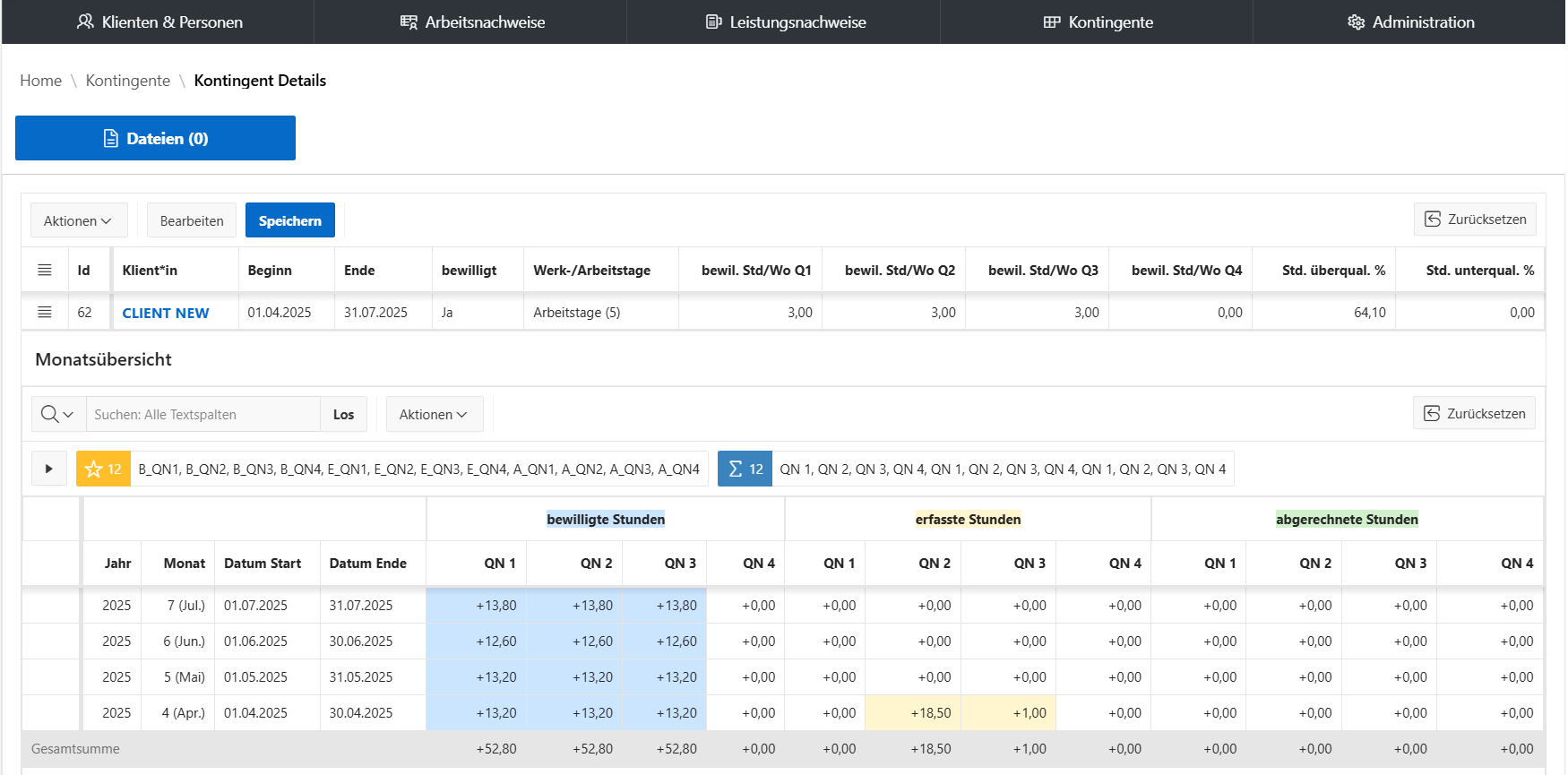
Assess individual assistance needs in a structured manner, in accordance with the pilot project guidelines. Create quotas based on this—for example, derived from the approved authorization notice.
The quotas and their calculations can be configured for either working days (5) or business days (6), allowing for nuanced calculation.
02 / Staff & Assignment Planning
Assign qualifications.
Coordinate assignments.
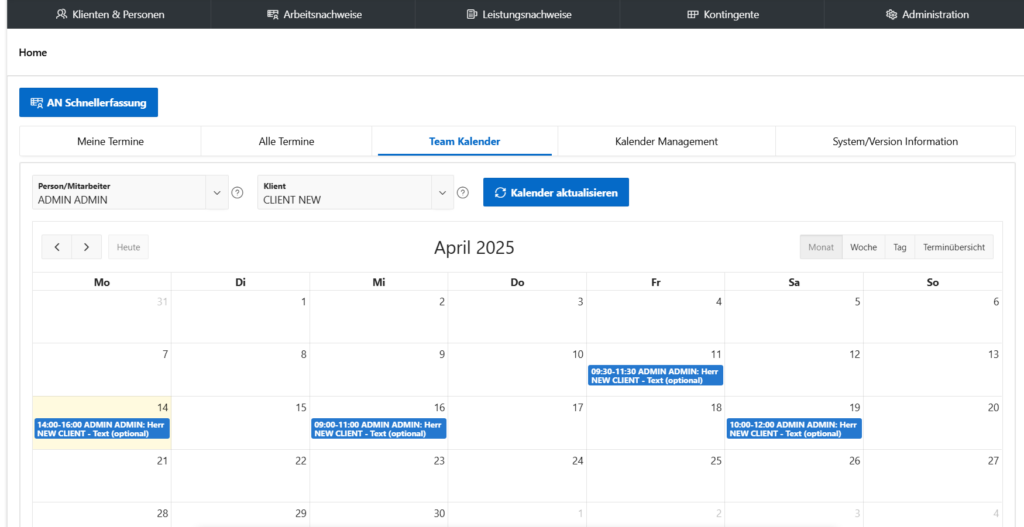
Assign staff to clients based on their qualification levels and the identified needs. Team calendars and appointment management support collaborative planning.
Optimal Matching
Take qualification levels and individual support needs into account when assigning staff members.
Collaborative Planning
Keep track of your team’s appointments and assignments.
Report Overview
Manage appointments for tasks such as care planning, as well as progress and final reports (HEB).
03 / Documentation & Proof of Service
Document services.
Maintain digital records.
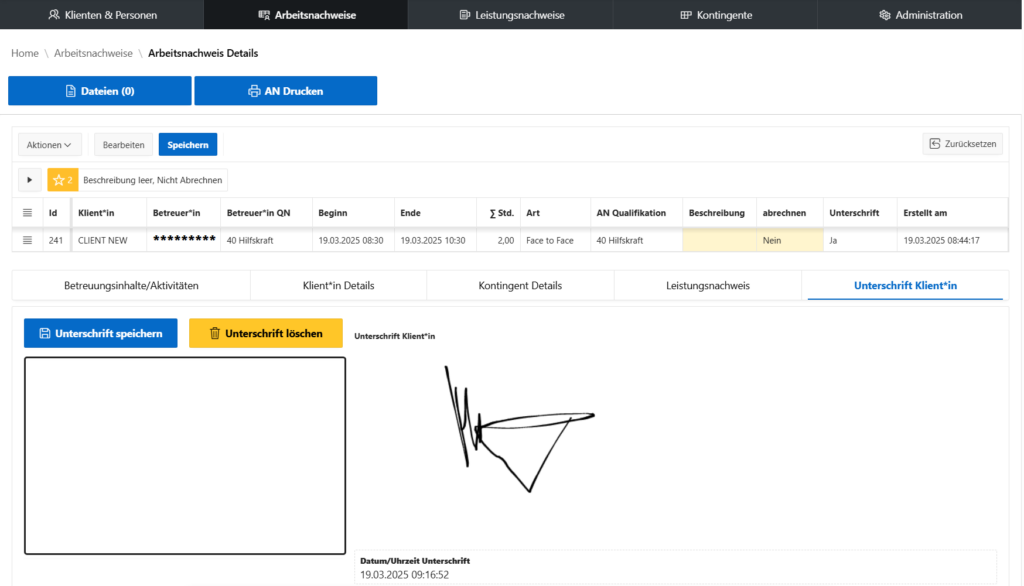
Digital signature included.Assign services to qualification levels.
- 01 / Structure
Customizable sets
Structure your documentation using customizable sets comprising life domains, categories, and associated activities.
- 02 / Assignment
Qualification levels
Assign services provided to specific qualification levels and ensure documentation is transparent and traceable.
- 03 / Confirmation
Digital signature
Clients can confirm work and service records directly with a digital signature.
04 / Mobile Data Entry
Document on the go.
Get signed off right away.
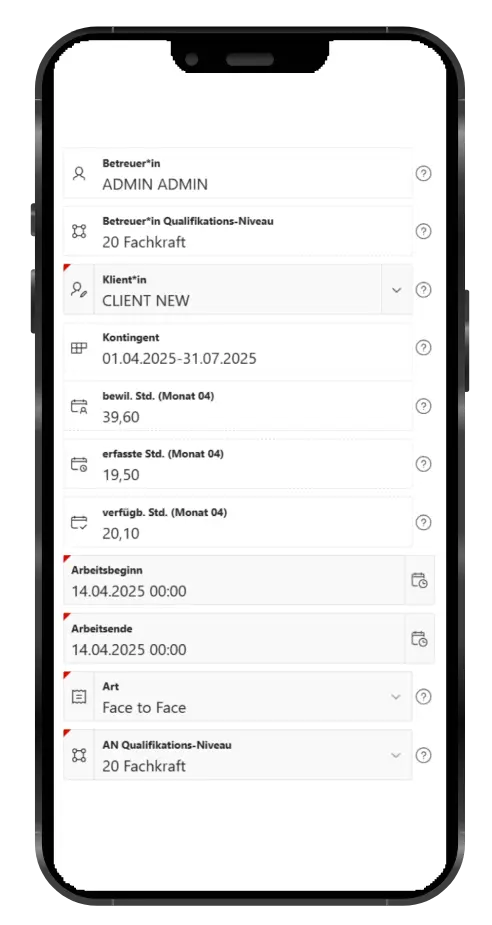
A quick-entry feature for mobile devices enables efficient documentation while on the move.
Clients can conveniently sign off directly on a smartphone or tablet.
05 / Billing
Close out the month.
Simplify billing.
Automatically generate service records while accounting for remuneration rates and corridor regulations. Billing for self-paying clients is also supported.
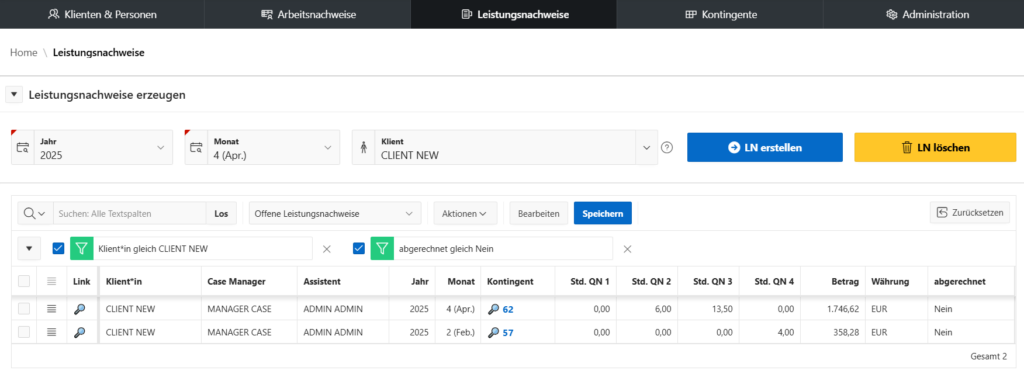
With a Single Click
Generate the monthly closing with one click and roll it back if necessary—for example, in the event of incorrect service records or invalid pricing.
Flexible Allocation
Transfer service records to the following month if billing is not required for the current month.
PDF via Email
Conveniently send generated PDF documents—such as service records and invoices—via email automatically.
06 / Customization & Access
Configure to fit.
Manage access.
dragon.ABD offers user-driven customization for work modes and types, personnel categories and types, as well as application configuration.
Its range of functions supports the efficient implementation of your planning, documentation, and billing requirements.
As with all software solutions from manage.it GmbH & …Co. KG includes the integrated authentication and authorization module dragon.XPF.
Optional add-ons
Expand to fit.
Tailored to your needs.
Enhance dragon.ABD with features for data backup, pre-configured systems, and regular reports.
Automatic backup
Automatic backup, including the database.
Ready to go
Fully pre-configured systems for using dragon.ABD are available.
Regular
ReportsWeekly, monthly, and annual reports in PDF, DOC, and RTF formats.
Further Links
Read up on the background.
Deepen your knowledge.
–>
Your next step
Organize care services.
Collaborate digitally.
Do you want to record assistance needs, plan assignments, or organize your service billing digitally? Discuss your requirements with us.
Get a consultation on dragon.ABDSchertlinstr. 39
86159 Augsburg, Germany